
Read a Conversion Report
A finished Conversion Report tells you where one page on your site loses shoppers. It shows the funnel Squoosh discovered, the single step that leaks the most, how the leak breaks down by shopping style and device, ranked fixes to act on, and quotes from the shoppers who left. A Conversion Report has no second version, no winner, and no lift or confidence. It is a single-page diagnostic, not a comparison.
To open a report, click Conversion Reports in the sidebar and select it from the list.
The headline
The top of the report names the worst leak in the funnel: Your funnel leaks at {step A} → {step B}. Below it, a sentence tells you where the biggest break falls and what shoppers hit there.
Three stats sit beside the headline:
- {X}% drop · {step A} → {step B} — the share of shoppers lost at the single largest break.
- {n} / {total} reached {leak step} — how many of the panel made it to the step where the leak lands.
- {X}% completed the funnel — the share who made it all the way through, with the count beside it.
Use the headline to find the fix with the most upside. The rest of the report shows you why shoppers left there.
What to fix first
What to fix first ranks the issues shoppers hit, ordered by impact. Each fix identifies what broke, where on the page it happened, and how many shoppers it affected, with an impact-versus-effort read so you can see which fixes carry the most upside for the work. When a fix maps to a change you can test, Create test turns it into an A/B test.
If the panel walked the funnel without a hard break, there are no ranked fixes to show.
Where it breaks
Where it breaks — and who you lose lays out the funnel Squoosh discovered on the page — for example product, add to cart, checkout, confirmation. Each step is a bar showing the count and share of shoppers who reached it, and the single largest consecutive drop is tagged Biggest leak, the step pair named in the headline.
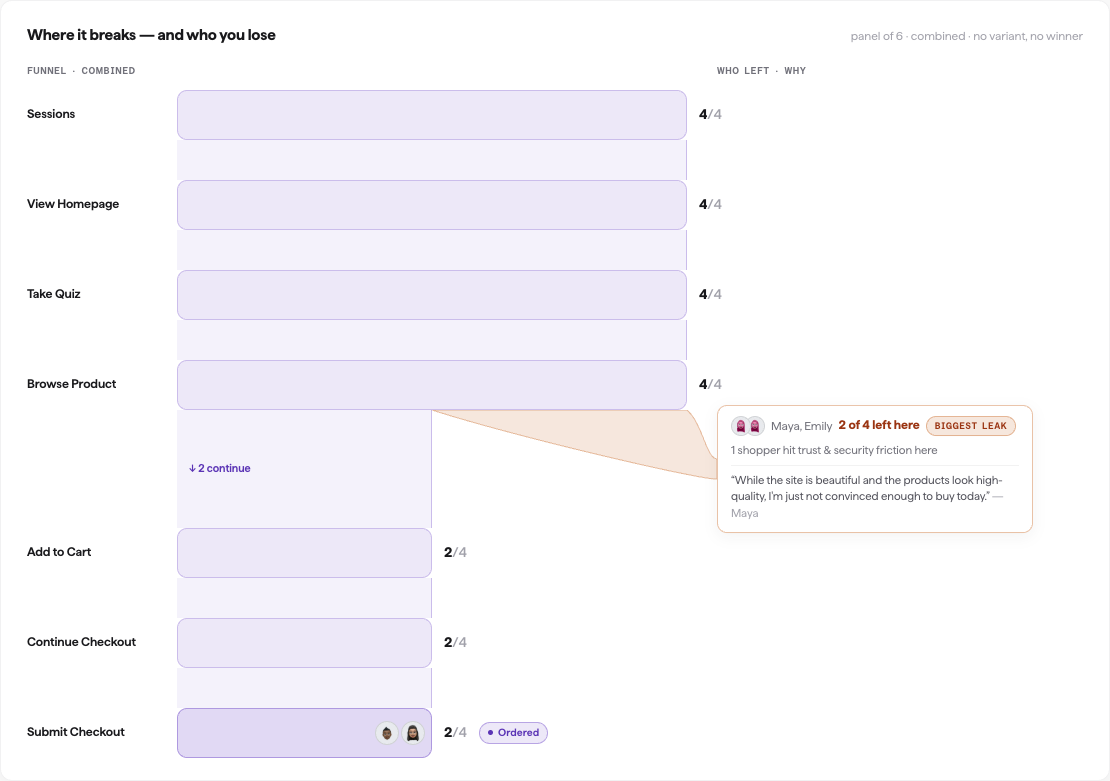
The funnel step by step, with the largest consecutive drop tagged the biggest leak.
The funnel doubles as the per-shopper detail: at the leak it names the shoppers who left, gives a one-line reason each stopped, and shows a verbatim quote in their own words — so you see both how much a step leaks and why. Squoosh discovers the funnel by crawling the page, so the steps and their names come from your site, not a fixed template.
Note
Only genuine drop-offs are counted. If a shopper's browser session failed, that shopper is excluded rather than shown as a leak, so a leak always reflects a real abandonment.
Who it leaks for
Who it leaks for shows how the leak pattern differs across three views, each on its own tab:
- Shopping style — how each archetype (Budget hunter, Deep researcher, Impulse buyer, Brand loyalist, Skeptic, Gift buyer) moved through the funnel.
- Device — how the leak compares across device types in the panel.
- Traffic source — how it varies by the source each shopper represented.
Use this section to find whether the leak is broad or concentrated in one segment. A leak that hits every archetype equally needs a different fix than one that only affects a specific style. Each segment shows the shoppers behind it as faces; click one to Watch that shopper's session.
This page over time
This page over time shows how the biggest-leak percentage has changed across prior reports on the same page (oldest to newest). Use it to track whether a change you made improved the funnel, held steady, or made it worse.
It appears only once you have at least two completed reports on the same page; a brand-new page shows no trend until you re-run.
Watch a shopper's session
In Who it leaks for, click a shopper's face to Watch that shopper move through the page, so you can see the friction first-hand. For how replays work and how to scrub through a session, see Watch shoppers.
What to do next
The report gives you two actions:
| Action | What it does |
|---|---|
| Re-run report | Runs the same Conversion Report again on this page. Useful after you change the page or want to see whether the leak has improved. |
| Create test | Turns a ranked fix into an A/B test so you can measure the change you make. |
When no funnel is found
If the crawl does not find a multi-step funnel on the page, there is no leak report to show, and the report says so. This usually means the page is a single step toward conversion rather than a multi-step flow. Point the report at a page that begins a funnel, such as a product page or the first step of checkout.