
Watch shoppers
While an experiment runs, you can watch synthetic shoppers move through both versions of your page, and after the run you can replay any shopper's session. This page covers the live shopper floor, the paired side-by-side Watch a shopper view, and session replays.
The live view is observational. It shows who is shopping and what they are doing, but no winner, lift, or confidence — those are held until the run finishes. See How Squoosh decides a winner for the verdict.
The live shopper floor
When you launch an experiment, the page opens on the live running view. Before shoppers start you see Warming up with a count of shoppers reserved; the view switches to the live floor on its own as shoppers begin.
The Live shopper floor shows one tile per shopper. Each shopper runs against both versions of your page — the original (Control) and the version you supplied (Variant) — so one tile is the same shopper running A and B, not two separate shoppers. The tile carries a small A·B badge to mark this.
Tiles fill in as shoppers begin. Each tile shows the shopper's name, a corner Watch control, and the current status:
| Status | What it means |
|---|---|
| Shopping | The shopper is moving through the page. |
| Added to cart | The shopper reached your conversion goal. |
| Left site | The shopper left without converting. |
The floor shows a sample of the shoppers in the run, not all of them at once. When more shoppers are active than the floor shows, the rest stream to replays you can watch after the run.
Above the floor, What's being tested shows the two pages side by side — the original framed as control and your version framed as variant. Below it, the Live funnel shows where shoppers drop off. The funnel is combined across both versions on purpose: a live per-version split would be a premature verdict, so the A-versus-B comparison is part of the finish-line result.
Note
Live progress does not trigger an early winner. The result is finalized after the shopper sessions have ended. See Experiment lifecycle and stopping.
Watch a shopper, side by side
To watch one shopper in detail, open the paired Watch a shopper view. There are two ways in:
- On the floor, click any shopper tile. The corner reads Watch.
- Use the Featured shopper panel above the floor, which surfaces a representative live shopper so you can watch a journey without picking one yourself.
Use Back to run to return to the floor.
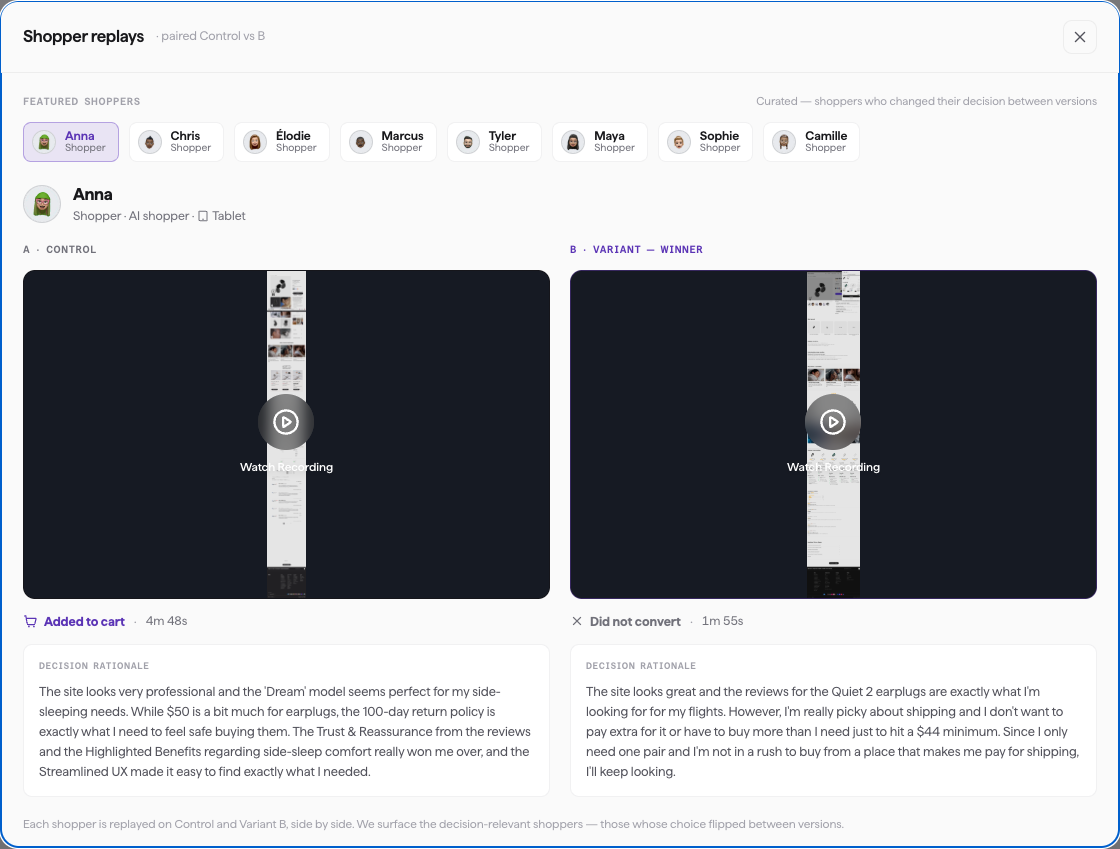
The paired Watch view — the same shopper on Control (A) and Variant (B), each with its outcome and decision rationale.
The Watch view shows the same shopper on both versions at once, in two real browser sessions running live:
- The left cell is labeled A · Control (the original page) and the right cell is labeled B · Variant (the version you supplied).
- Below the cells, the shopper's reasoning streams as it decides. While the shopper is still shopping, this is a representative line of its thinking; once the shopper decides, its real words replace it.
- The Session log lists the shopper's steps in order, from session start to the outcome.
- A step-by-step breakout shows each action the shopper took on A · Control and B · Variant, so you can see where the two paths diverge.
To move between shoppers without leaving the view, use the Switch avatar row or the Shopper number picker.
Because each cell is a live browser session, you may briefly see states like Connecting to browser or Wrapping up session as a shopper starts or finishes. Each cell switches from the live session to a replay when that shopper finishes.
Watch session replays
After a shopper finishes, you can replay its session. On a finished cell, click Watch Recording to load the recorded session.
A finished cell also shows the shopper's outcome — Converted (or your conversion goal verb, for example Added to cart) or Did not convert — and a short Decision rationale explaining the shopper's choice.
You can also reach replays from the verdict. In the evidence section of a finished experiment, each individual shopper voice links to that shopper's recording, so you can watch the journey behind any quote.
Replays load once the run finishes. If you open one and see Recording not ready yet — try again in a moment, wait a moment and use Retry.